Clean Code window
The Clean Code (BASIC Minify) window opens from Main > Tools > Clean/Minify Basic... option. This tool works on the current BASIC source. It minifies and normalises the program in-place before re-tokenising it.
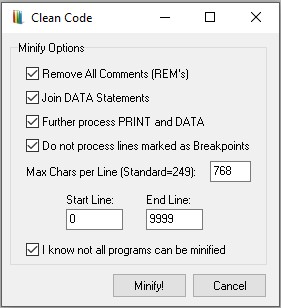
This tool is aimed at experienced users who want to reduce program size, streamline DATA usage, or prepare code for export, archiving, or assembly workflows.
General workflow
- Open the dialog from the editor.
- Configure the options below.
- Click Minify! to apply the changes, re-tokenise, and refresh the listing.
- Click Cancel to close the window without modifying the program.
Important safety note
Not all BASIC programs can be safely minified. Some routines depend on precise line structure, embedded formatting, debugger breakpoints, or loader-style self-modifying logic. You must acknowledge this risk before the operation can run.
Consider avoiding minification when output spacing matters, when DATA lines are addressed by number, or when temporary breakpoint markers are still in use.
Options
Remove all comments (REMs) |
Deletes every REM line to reclaim memory and pack tokens more tightly. Best for release builds or tape/snapshot exports; avoid while debugging or when inline documentation must remain. |
Join DATA statements |
Merges consecutive DATA lines into longer lines, cutting down line headers and storage. Use when DATA is purely static and line numbers are irrelevant; avoid if the program jumps to specific DATA line numbers or if visual separation is important. |
Further process PRINT and DATA |
Enables deeper restructuring for extra compression and possible expression reformatting. Use once the code is final and no runtime string manipulation depends on current spacing; avoid when output alignment is visually sensitive. |
Do not process lines marked as breakpoints |
Skips any line that contains a debugger breakpoint so its structure remains intact. Recommended while stepping or tracing; disable when finalising production code and breakpoints are no longer needed. |
Max chars per line (standard = 249) |
Sets the maximum length a BASIC line may reach after minification. The default 249 is the standard safe limit; higher values create fewer lines with stronger compression, lower values favour readability and compatibility with older tools. |
Start line / End line |
Restricts processing to a line-number range. For example, 0–9999 processes the entire program, while 100–500 targets a single routine. Use this to test minification on a section or to protect loader and initialisation code. |
Confirmation checkbox |
"I know not all programs can be minified" must be checked before Minify! is enabled. It prevents accidental destructive edits and enforces a conscious choice to proceed. |
Buttons
- Minify! Applies all selected operations, updates the BASIC buffer, and re-tokenises before refreshing the editor view.
- Cancel Closes the dialog and makes no changes.
Interaction with Memory Manager
All actions run on the active BASIC buffer. Changes are applied before re-tokenisation, and the view refreshes automatically. Depending on your workflow, undo may not be available; create a snapshot or backup before aggressive minification.