SimpleCon V2 window
SimpleCon V2 is a lightweight console interface that lets Sinclair BASIC programs running in the emulator send text directly to a native Windows log window. It bridges Spectrum code to the host UI using a small memory buffer and a two-port I/O protocol.
Why it exists
The Spectrum has no standard text console device for structured debug output. SimpleCon solves this by exposing a 255-byte character buffer, a single index register, and two ports so BASIC or assembly code can stream text to a Windows log without touching screen memory.
Memory model and ports
- Buffer: 255 bytes for characters.
- Index byte: internal pointer, range 1..255; index 0 is reserved as Line Feed / Commit.
- Ports: 1259 (0x04EB) for index control; 1515 (0x05EB) for data read/write.
- Behaviour: writing to port 1515 stores a byte at the current index and auto-increments; writing 0 to port 1259 commits the line to the log.
User interface elements
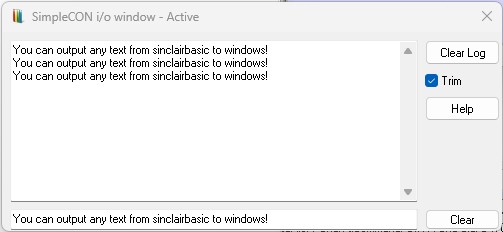
- Text input field: shows the 255-byte buffer live; edits update SimpleCon memory immediately; useful for inspection or manual entry.
- Clear: clears the input line and resets the buffer to spaces; does not clear the log.
- Trim checkbox: when enabled, removes leading and trailing spaces on commit (index set to 0); leave disabled for fixed-width output.
- Clear log: clears the memo/log window without touching the buffer.
- Help: shows a brief usage reminder.
Typical workflow
- Set the index with port 1259.
- Send characters one by one using port 1515.
- Commit the line by writing 0 to port 1259.
- The line appears in the log; the index resets to 1.
Example: BASIC output to SimpleCon
10 LET m$="Hello from Sinclair BASIC!"
20 REM Set index to start of buffer
30 OUT 1259,1
40 FOR i=1 TO LEN m$
50   OUT 1515, CODE m$(i)
60 NEXT i
70 REM Commit line (line feed)
80 OUT 1259,0
Result: the message appears in the SimpleCon log; the input field mirrors the text; the index wraps back to 1.
Example 2: BASIC input from SimpleCon
1 REM SimpleCon V2 Read Input  Demo
10 CLS
20 PRINT INK 1;"Clear First and Write Something into Simplecon window."''"Press a key when ready."''
30 PAUSE 0
40 OUT 1259,1
50 REM read every byte
60 FOR x=0 TO 254
70 INK 2: PRINT CHR$ IN 1515;
80 NEXT x
Run the program, and open simpleCon window and type something into InputBox. Go back to basinC display window and press any key, your basic program will read the contents of the input box.
Notes and best practices
- Maximum line length: 255 characters; index auto-wraps from 255 to 1.
- OUT 1259,0 both commits and acts as a line feed.
- SimpleCon never writes to screen memory; ideal for logging and tooling, not gameplay UI.
- Designed for deterministic behaviour in BASIC and assembly workflows.
Summary
SimpleCon V2 keeps the Spectrum programming model intact while providing a modern, explicit console path for debugging and logging. It is intentionally simple, predictable, and easy to integrate into both BASIC and assembly code.