BasinC Snippets window
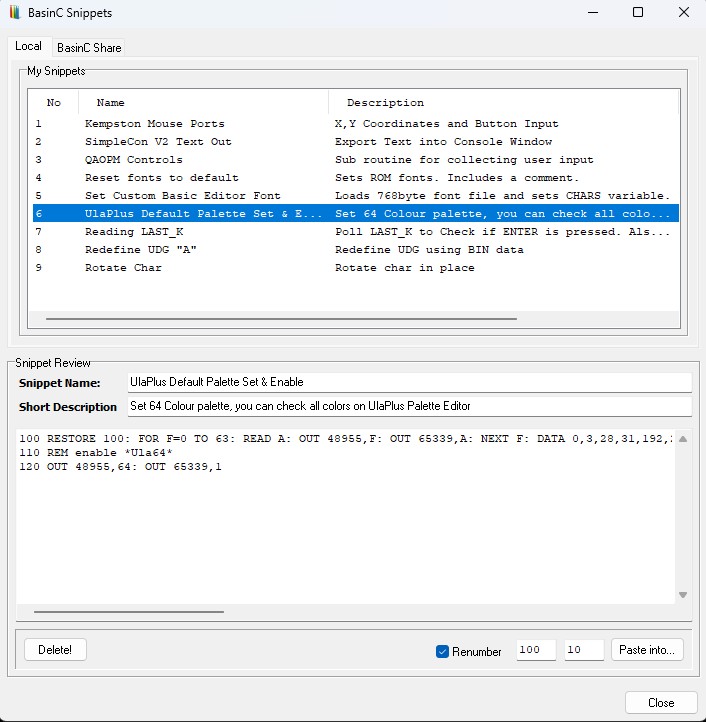
The BasinC Snippets (Basinet) window is a lightweight local library for ZX Spectrum BASIC code. It lets you capture selected BASIC lines from the editor, store them in BasinCSnips.dat with a name and description, review them later, optionally renumber, and paste them back into the editor.
How to add a new snippet?
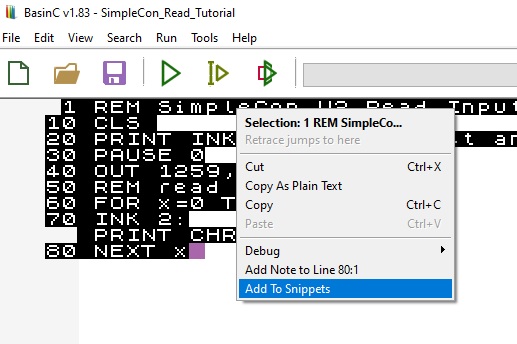
Just write your code into main editor window. Select the lines you want to add as a snippet. Right click and select "Add to Snippets"
Local tab
My Snippets list
- Shows all saved snippets from BasinCSnips.dat.
- Columns: No (sequential display index), Name, Description, Owner (shows “You”), State (shows “Local”), ID (internal identifier to prevent collisions).
- Click a snippet to load its details into the lower pane.
Snippet details (lower pane)
- Snippet Name: Title for the snippet. Defaults to “New Snippet” when adding; saving is blocked if the default name remains.
- Short Description: Brief note describing the snippet.
- Snippet viewer: Read-only preview of the BASIC code. When loaded, BasinC may rejoin continuation lines (see Renumber notes).
Buttons and options
- Delete! Removes the selected snippet from BasinCSnips.dat. Enabled only when a valid snippet is selected.
- Renumber: When checked, BasinC renumbers snippet lines and updates targets for GO TO, GO SUB, RESTORE, and RUN. Renumbering runs when you load/select a snippet if enabled.
- Start / Step: Starting line (default 100) and increment (default 10) used by renumber.
- Renumber warnings: If a target line cannot be mapped, BasinC may highlight the start field (yellow) to flag an unresolved reference.
- Paste into… Sends the snippet to the Add Code workflow and inserts it into the program. Disabled while the emulator is running; stop execution before paste the code.
Add-to-library mode
Visible only when entering from “Add to Snippets” in the editor.
Saves the snippet (name/description + raw code) into BasinCSnips.dat.
You should change the name of the snippet, it's mandatory. If the name is still “New Snippet”, saving will be refused.
Typical workflows
A) Save a new snippet
- Select BASIC lines in the editor.
- Right-click → Add to Snippets.
- In BasinC Snippets, set Snippet Name and Short Description.
- Click Add to My Snippets. The snippet appears under Local → My Snippets.
B) Reuse a saved snippet
- Open BasinC Snippets and go to Local → My Snippets.
- Select a snippet to preview it.
- If needed, enable Renumber and set Start/Step.
- Click Paste into… to insert it back into your code.
C) Delete a snippet
- Select a snippet in the list.
- Click Delete!
Notes and limitations
- Storage is local in BasinCSnips.dat.
- The Share tab exists but is disabled in this build (“Local Only Version”).
- The snippet preview is read-only; make edits after pasting into the editor.
- Renumber adjusts only the four keywords above and expects fairly standard BASIC formatting.