BasinC Bridge window
The BasinC Bridge window is a central data-exchange hub between tools and windows inside BasinC. It was originally a helper for the Memory Grabber, but now acts as a generic intermediary layer so data can be moved between tools in a controlled, flexible way.
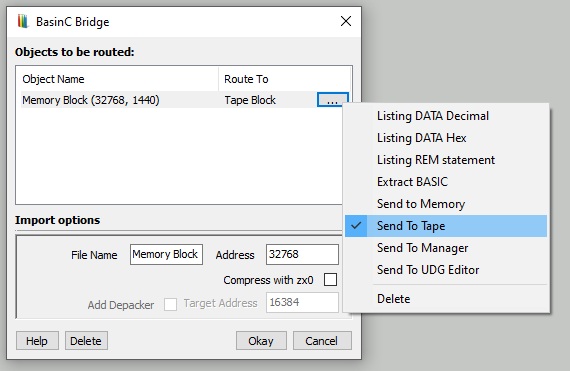
How the Bridge is invoked
- Grab: The common entry point. A tool issues Grab to send the current data block directly into the Bridge.
- Send To... Some tools offer Send To... commands that also forward their data into the Bridge so you can redirect it to another destination.
Optional ZX0 compression
During redirection you can compress the data with Einar Saukas’ ZX0 algorithm. This is useful for large blocks, especially when targeting memory- or tape-based outputs.
Supported targets
Listing DATA Decimal
Writes the Bridge data into your BASIC listing as DATA statements using decimal values. A fast way to embed bitmap or binary data directly in BASIC.
Listing DATA Hex
Same as above, but writes DATA statements using hexadecimal values.
Listing REM Statement
Appends the data as a comment to a REM on the first line. Best for very small code blocks.
Warning: Requires advanced knowledge of BASIC internals—use with care.
Extract BASIC
Use when the Bridge holds a BASIC program image. The Bridge analyses the block, extracts the BASIC lines, and merges them into the current listing.
Send to Memory
Loads the data directly into a specific memory address.
Send to Tape
Outputs the Bridge data as a tape block, ready for cassette.
Send to Manager
Adds the data block as a new entry in the Memory Manager.
Send to UDG Editor
Attempts to load the data into the UDG Editor as character data.
Delete
Removes the current data block from the Bridge.